RCS Template Management
The Template Management module for RCS in SmartTA provides a unified interface to create, view, and manage RCS message templates that are activated through the Sinch India RCS platform.
Templates Dashboard
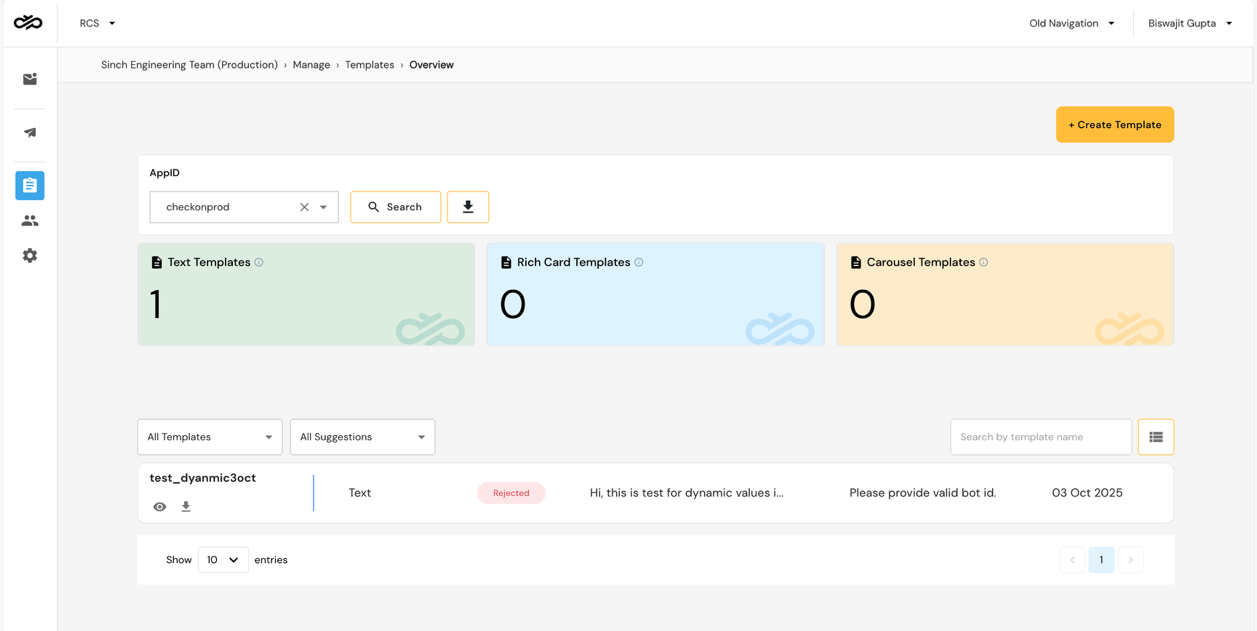
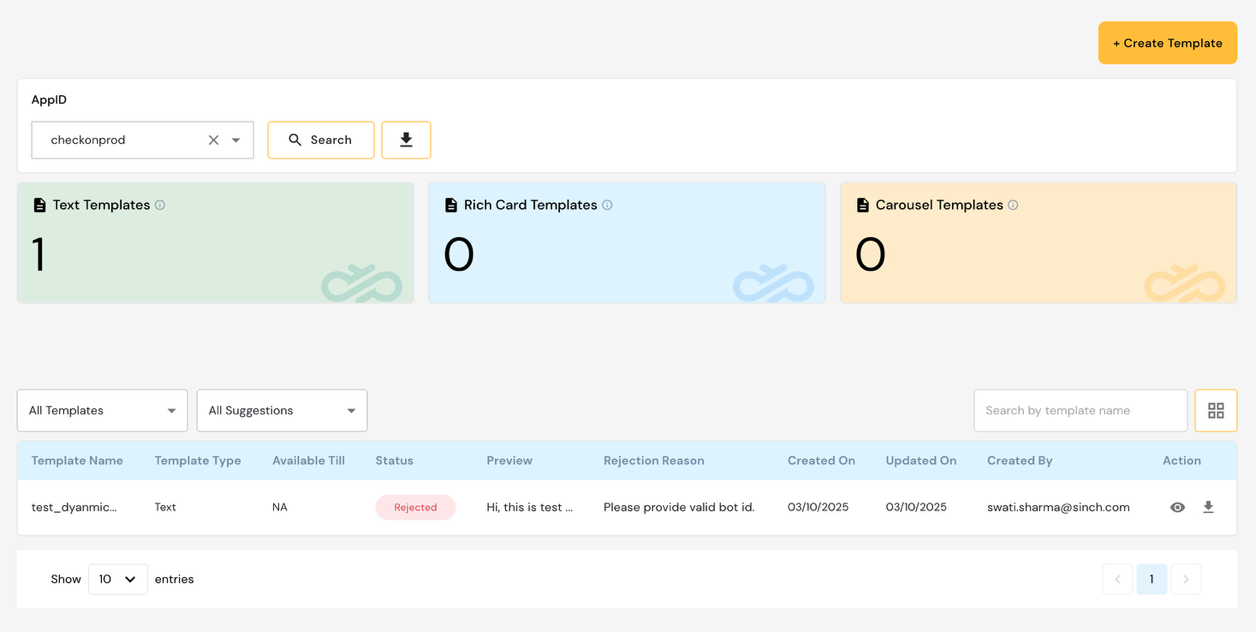
The Templates Dashboard provides a complete view of all RCS templates.
Template fields displayed:
| Field | Description |
|---|---|
| Template Name | Unique name for the RCS template |
| Type | Text / Rich Card / Carousel |
| Status | Active / Pending / Rejected / Disabled |
| Created On | Template creation date |
| Actions | View / Edit / Enable / Disable |
Template Statuses
| Status | Description |
|---|---|
| Active | Template is approved and available for campaigns |
| Pending | Awaiting activation by the operator |
| Rejected | Not approved due to policy or format issues |
| Disabled | Manually disabled by the enterprise user |
Template Synchronization
RCS templates are synchronized with the Sinch India RCS platform. Any status changes made at the platform level are reflected in SmartTA automatically.
Message Template Quality Rating
Unlike WhatsApp, RCS templates do not have a Meta-assigned quality rating. However, Sinch India monitors delivery performance and may flag templates with high failure rates for review.
Template Component and Structure
RCS templates support a rich set of components:
Message Text
The main text content of the RCS message. Guidelines:
- Maximum character limit varies by operator
- Supports standard Unicode characters
- Dynamic variables can be included
Rich Cards
A Rich Card is a structured message format that combines:
- Title — Short card heading
- Description — Descriptive body text
- Media — Image or video attachment
- Suggested Replies — Up to 11 quick-reply options
- Suggested Actions — Up to 4 action buttons
Rich Card media specifications:
| Media Type | Formats | Max Size |
|---|---|---|
| Image | JPG, PNG | 1 MB |
| Video | MP4 | 5 MB |
Rich Card Carousels
A Carousel template contains 2–10 Rich Cards displayed in a horizontally scrollable format.
Each card in a carousel includes:
- Image or video (consistent format across all cards)
- Title and description
- Up to 2 buttons (Suggested Reply or Suggested Action)
Suggested Replies
Suggested Replies appear as tappable chips below the message:
- Maximum 11 suggested replies per message
- Each reply text up to 25 characters
- Tapping a reply sends that text back as an inbound message
Suggested Actions
Suggested Actions are interactive buttons that trigger specific device actions:
| Action Type | Description |
|---|---|
| Dial | Opens the phone dialler with a preset number |
| Open URL | Opens a web URL in the device browser |
| Share Location | Prompts user to share current location |
| Create Calendar Event | Adds an event to the device calendar |
| View Location | Opens a map with specified coordinates |
Template Rendering Considerations
- Rich Cards with large images may render differently across devices and operators
- Ensure media aspect ratios match RCS specifications (recommended: 16:9 for landscape)
- Always provide fallback text for devices that do not support RCS
Edit Template
Editing Restrictions:
- Active (live) templates may have limited editability
- Template name cannot be changed after creation
- Structural changes (component type) may require re-submission
Enable / Disable Template
- Enable — Makes the template available for RCS campaigns
- Disable — Removes the template from campaign selection without deleting it
Screenshots
Templates Dashboard
Manage / View Template